ERP. Delivered
at AI speed.
Autothrust is your AI-powered self-service platform for Microsoft Dynamics implementations. Radically faster and at a fraction of the cost, while automatically capturing, structuring and retaining your business knowledge, ready for the AI era.
What does AI already know about your company? Free · 90 seconds · no access to your systems
See Autothrust live in action. Your first discovery drafts your business processes: the basis for a demo implementation and a first refinement sprint.*
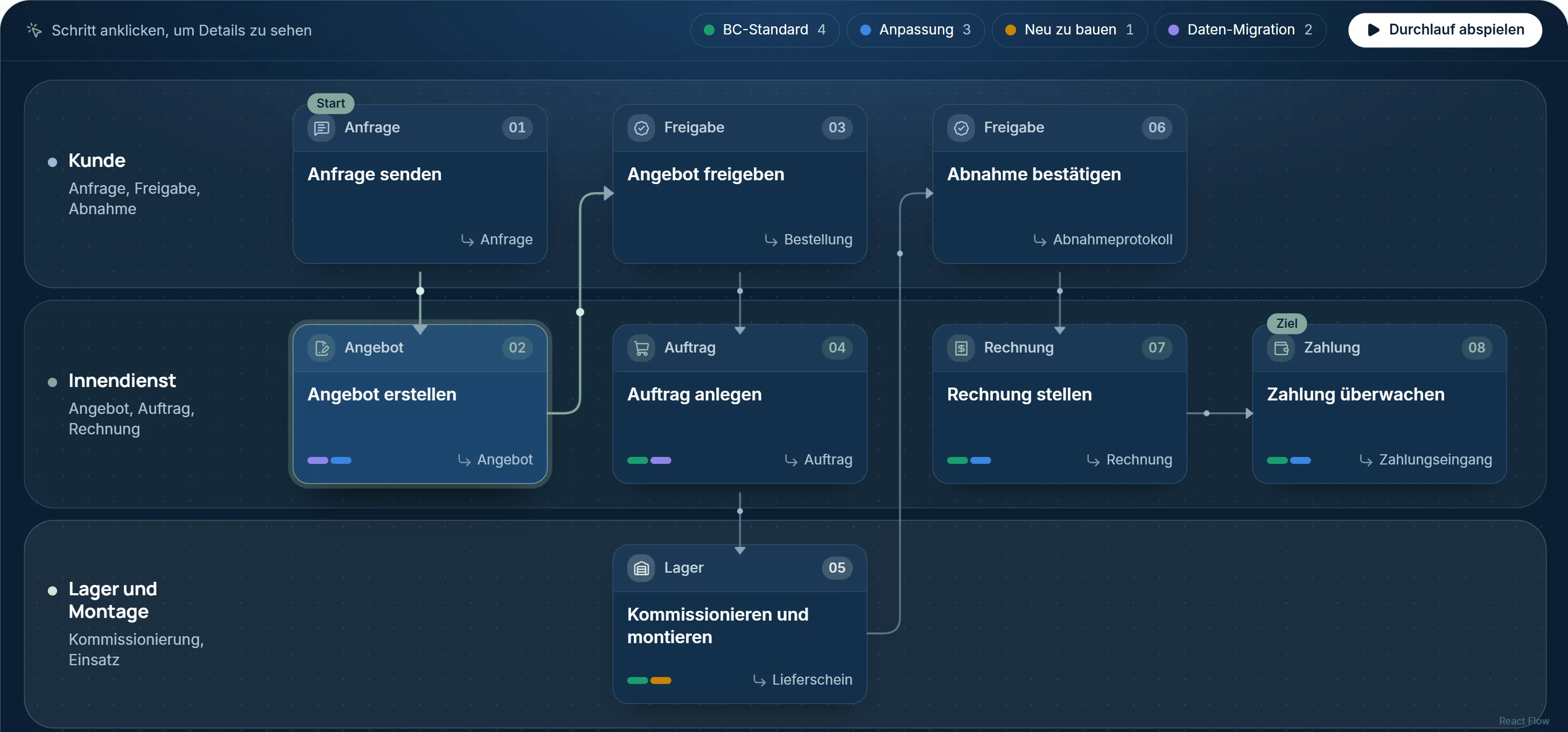
Traditional Consulting vs. Autothrust
Same project. Station by station.
Drag the slider to the right. Every station it crosses switches from traditional consulting to Autothrust.
1 · Understand · Traditional
Consultant: Workshops, interviews, minutes
− Knowledge stays in heads
2 · Design · Traditional
Consultant: Concept paper and review rounds
− Paper, not a system
3 · Build · Traditional
Developer: Codes after the hand-over
− Context gets lost
4 · Test · Traditional
Key users: Test by hand and find bugs
− Back to the consultant
5 · Knowledge · Traditional
Project folder: Documents spread across drives
− Leaves with the people
0 of 5 stations with Autothrust
All traditional: consultant, developer, test, and round again.
The platform
One core, the whole project.
Autothrust keeps your project knowledge in one place. Everything else works with it: from the requirements book to the test.
Core
Knowledge base
Every rule, every decision, every conversation in one place. It stays, even when people leave.
Requirements book
Writes itself from your processes, with reasons and sign-off by your key users.
Data clean-up
Finds duplicates, gaps and legacy data before they move to Business Central.
Build agents
Extensions and migration runs for Business Central, around the clock.
Test agents
Every change gets its test cases right away. Every release is checked on real cases.
Cockpit for management
Status, conflicts and decisions in plain words. You always know what is going on.
Our implementation process
From the first draft to go-live.
You see your processes in the system early and refine them in sprints, instead of reading concepts for months. Autothrust works in every phase, and everything that is decided goes into your knowledge base. Typically 4 to 6 months to go-live.
Phase 1 of 6
Discovery
Autothrust researches your company in public sources and, with best practice, drafts a first map of your business processes.
What Autothrust does
Searches your website, job postings, company register, press and trade media, combines the findings with best practice and derives the requirements for Business Central for every process step.
What your team does
Enter your company website. No questionnaire, no access to your systems.
Result
First draft of your business processes
Why AI in an ERP project
What used to get lost now stays.
- Processes
- Special logic
- Master data rules
- Interfaces
- Decisions
- Requirements
- Test cases
- Sign-offs
An agent does not turn bad data into good data. It just makes it wrong faster.
ERP projects rarely fail because of the partner. They fail when knowledge gets lost along the way.
How to start
See first. Then decide.
Discovery
€0/ free
For everyone who wants to see in 90 seconds where their company stands on the way to Business Central.
- Process map of your company
- Web research on four tracks, every finding with its source
- Requirements for Business Central per step
- Roadmap, risks and open questions
ProjectRecommended
4–6 months/ to go-live
For companies that want to clean up their ERP and move it to Business Central with AI agents.
- Agents build and test around the clock
- Requirements book and knowledge base belong to you
- Data cleaned up before it is migrated
- Cockpit for management
Questions
Good to know.
What does the AI analysis by overtAIke cost?
The AI analysis is free, including the full version. You see the summary with your process map right away. You unlock the full analysis with requirements, findings and roadmap by entering your name, email address and phone number.
Does overtAIke need access to our systems for the analysis?
No, the analysis uses only publicly available information and needs neither access to your systems nor a questionnaire. The AI reads your web presence and searches the internet for job postings, press reports, company profiles, company register entries and software references. Every finding appears in the analysis with its source.
How does the AI analysis for the move to Business Central work?
You enter the address of your company website, an AI reads your web presence, researches public sources on the internet and builds a process map with the requirements for Business Central. The research runs on four tracks: job postings, software and IT, press and news, and company profiles. You see live which pages the AI reads, and the result appears on the page after a few minutes.
What is the difference between Microsoft Dynamics NAV and Business Central?
Business Central is the successor to Microsoft Dynamics NAV: built on the same functional foundation, but run mainly as a cloud service, customized through extensions instead of changes to the standard code, and updated by Microsoft on a regular schedule. In NAV, customizations were usually written directly into the standard code in C/AL, which made every update a lot of work. In Business Central, customizations stay separate from the standard as AL extensions, and the cloud version gets two major updates per year. On top of that come the integration with Microsoft 365 and Power BI and the Copilot features.
How long does a move from NAV to Business Central take?
A move to Business Central with overtAIke typically takes 4 to 6 months until go-live. The duration depends mainly on the scope and number of customizations, the quality of the master data and the interfaces. The free analysis shows a first roadmap with phases for your company.
Can NAV customizations be carried over to Business Central?
Not unchanged: customizations from NAV, usually written in C/AL directly in the standard code, are rebuilt as AL extensions for Business Central, unless the standard already covers them. That is why the move starts with an inventory: which special logic is still in use, which does the standard replace, which needs an extension? At overtAIke, AI agents build the extensions you need, and each one gets its test cases right away.
What can an AI agent do in a Business Central project?
At overtAIke, AI agents carry the project work: they analyze the old system and the data, write a concept for each process, build extensions and migration runs, and check every release with test cases. The agents work in parallel and around the clock on a shared knowledge base, and the sign-off stays with your key users. Once the system is live, agents can also take over recurring tasks, such as preparing incoming documents.
Why not simply put AI agents on top of the existing ERP?
Because an AI agent works with the data it finds, and it does not turn bad data into good data; it just processes it wrongly, faster. An agent automates duplicate items, outdated prices and undocumented special logic just like everything else. That is why overtAIke cleans up first and adds agents second. The ERP is built on clean master data before AI works on it.
— Get started
Your ERP project starts with 90 seconds.
Enter your website, watch what the AI finds out about your company, and go into the first conversation with a plan. Before you sign anything.